… How to Use My Mortgage Default Insurance Calculator Like a Pro
Buying a home in Canada can feel like stepping into a maze of numbers, acronyms, and fine print — but it doesn’t have to. Whether you’re a first-time buyer or a seasoned investor, understanding how default insurance works is key to knowing your real costs and options. That’s exactly why I created the Mortgage Default Insurance Calculator on AllenEhlert.com — a straightforward tool to help you figure out how much CMHC, Sagen, or Canada Guaranty insurance you’ll need (and how it affects your total mortgage).
This isn’t just another calculator; it’s a decision-making tool that helps you see your options clearly — before you commit to a lender or an offer.
Let’s break it down together.
Topics I’ll Cover
What Is Mortgage Default Insurance
When You Need to Use the Calculator
How to Use the Calculator (Step-by-Step)
Understanding the Different Modes
Real-World Example: How This Helps in Practice
How Realtors and Clients Can Use This Tool Together
What Is Mortgage Default Insurance
If you’re buying a home with less than a 20% down payment, Canada’s lending rules require mortgage default insurance. This coverage protects the lender — not you — in case you default on payments. But here’s the good part: it also allows you to get into a home with as little as 5% down, and at competitive interest rates, since lenders treat insured mortgages as lower-risk.
The premium (the cost of this insurance) is added to your mortgage amount — meaning you don’t pay it upfront. But that premium does affect your total mortgage size and monthly payments. That’s where my calculator comes in handy.
When You Need to Use the Calculator
Think of the calculator as your “truth detector” before making an offer or finalizing your financing. You’ll want to use it when:
- You’re exploring how different down payments affect your costs.
- You’re deciding whether to put 5%, 10%, or 15% down.
- You’re comparing insured vs. uninsured mortgage options.
- You’re working with a realtor or financial planner and need accurate payment projections.
- You’re renewing or refinancing and want to understand if insurance still applies.
This tool helps you make an informed choice — not a guess.
How to Use the Calculator (Step-by-Step)
Here’s how you can use it like a pro:
- Enter the purchase price of the home you’re considering.
- Input your down payment amount or percentage. The calculator will automatically determine if insurance applies.
- Select your amortization period (usually 25 or 30 years).
- Choose your mode (we’ll cover this next).
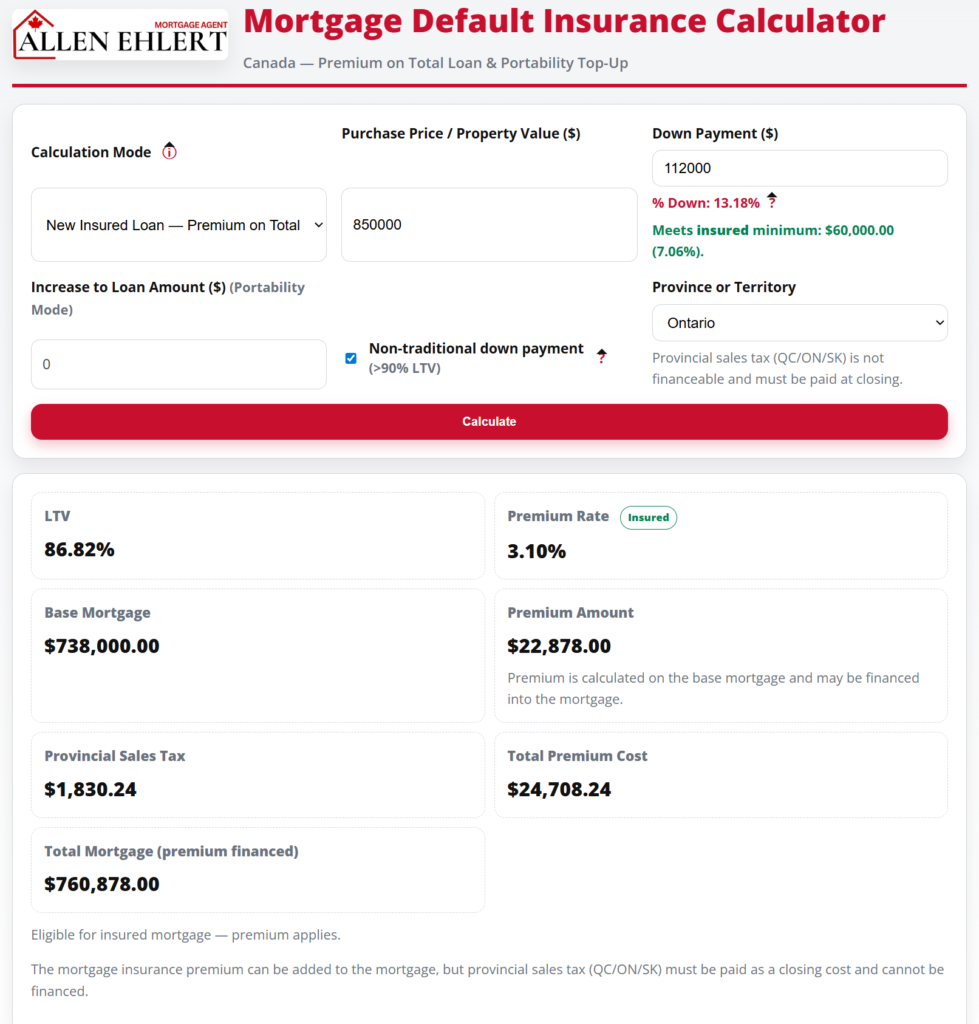
- Click “Calculate” and review your results — including your premium, total mortgage amount, and loan-to-value ratio.
You’ll instantly see how your down payment choices affect the insurance premium and overall borrowing cost.
Understanding the Different Modes
The calculator features multiple modes — designed for different users and purposes. Here’s what they mean:
Mode 1: Standard Purchase Mode
Use this when you’re buying a new home and want to know your exact premium based on your down payment. It’s perfect for first-time buyers comparing options — like 5% vs. 10% down.
Mode 2: Refinance Mode
If you’re refinancing your mortgage, this mode helps determine whether insurance applies or if your existing insurance can carry over. Refinances over 80% loan-to-value (LTV) aren’t typically eligible for new insurance, but understanding your ratio is crucial for planning.
Mode 3: Portability or Switch Mode
Ideal when you’re moving your mortgage from one property or lender to another. Some insured mortgages can “port” — meaning you can transfer the insurance to a new property without paying another premium. This mode helps estimate how that might look.
Each mode is designed for real-world use — whether you’re buying your first condo or upgrading to your dream family home.
Real-World Example: How This Helps in Practice
Let’s talk about Sarah and Tom. They were looking at a home priced at $750,000 with 10% down. Using my calculator, they realized their loan-to-value was 90%, meaning they needed default insurance. The calculator showed the premium would add $21,375 to their mortgage — bringing the total loan amount to $696,375.
Seeing those numbers helped them decide to increase their down payment slightly. By bumping it to 15%, they saved over $5,000 in insurance costs and lowered their monthly payment.
Their realtor loved this too — it gave her real-time insight to adjust their search and price range with confidence.
How Realtors and Clients Can Use This Tool Together
Realtors can use this calculator in listing presentations or buyer consultations to demonstrate real affordability. It’s a powerful way to show clients that “budget” isn’t just about the sticker price — it’s about how mortgage insurance impacts the full picture.
Clients, on the other hand, can use it while house-hunting to test “what if” scenarios — 5% down today, 10% if they wait three months — and see the numbers instantly. It turns guesswork into strategy.
Allen’s Final Thoughts
Default insurance doesn’t have to be a mystery. With the right tools, it becomes a simple part of the homebuying equation — not a hidden surprise.
My Mortgage Default Insurance Calculator was designed to empower you with clarity. Whether you’re a client running numbers on your own or a realtor helping clients strategize, it’s built to make informed decisions easy.
And remember — a calculator can crunch the numbers, but it can’t design the strategy. That’s where I come in.
As a mortgage agent, I’ll help you:
- Determine whether your mortgage should be insured or conventional,
- Strategize how much to put down,
- Navigate which lender’s policy (CMHC, Sagen, or Canada Guaranty) benefits you most, and
- Ensure your mortgage structure fits your long-term goals.
When you’re ready to go beyond the calculator, I’m here to turn those numbers into a tailored mortgage plan that gets you home — faster and smarter.