… How to Know Exactly What You’ll Need on Closing Day
Picture this: you’ve saved your down payment, found the perfect home, and negotiated an offer. You’re riding high—until someone says, “Don’t forget about closing costs.” Suddenly, you’re left wondering, “Wait… how much extra cash do I actually need?”
That’s the tough thing about closing costs, knowing what all the little things and not-so-little things are and how they all add up. Experts say you should have 1% to 4% set aside for closing costs, but on a million-dollar home, that’s a big range.
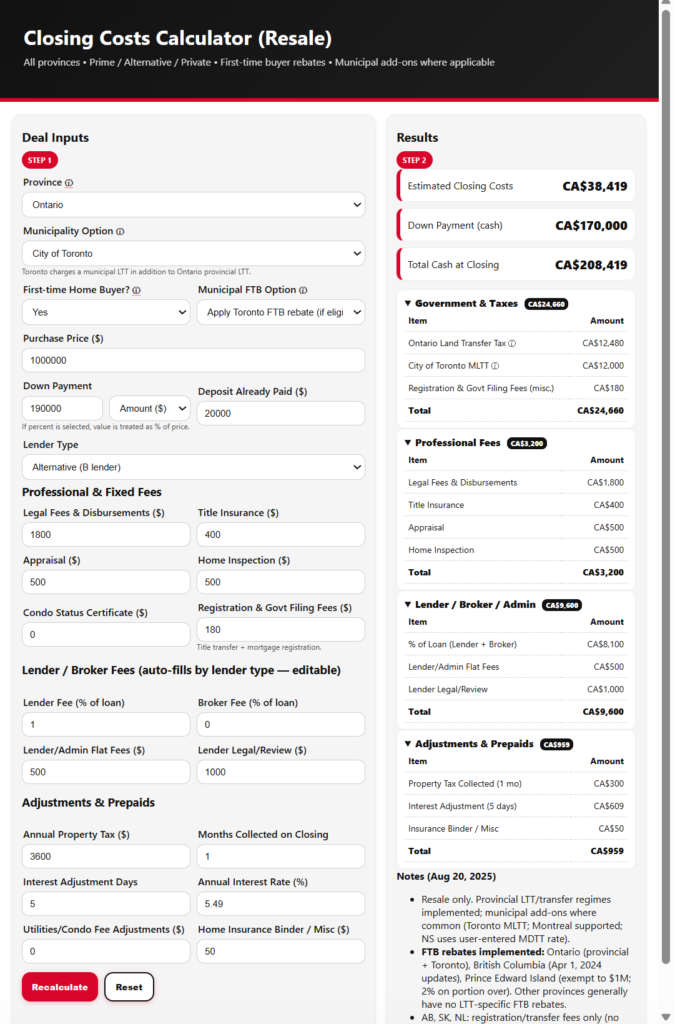
That’s where my Closing Costs Calculator swoops in. This tool doesn’t just spit out a random number—it walks through all the hidden (and not-so-hidden) expenses that come with buying a home in Ontario. It accounts for the type of buyer you are, the kind of mortgage you’re getting, and every little adjustment in between.
Here’s what I’ll uncover today:
Why Closing Costs Matter More Than You Think
How the Calculator Breaks It Down (Step by Step)
A Realtor’s Secret Advantage in Client Conversations
A Story: Lisa’s First Home and the “Surprise” That Wasn’t
Putting the Numbers Into Practice
Why Closing Costs Matter More Than You Think
The biggest mistake buyers make? Thinking the down payment is the only hurdle. But buying a home has more moving parts than a Swiss watch. Closing costs can add up to thousands—or tens of thousands—depending on the price of the property and where you’re buying.
The calculator takes the mystery out of it so you’re not blindsided on closing day. Instead of scrambling for cash, you walk in prepared and confident.
How the Calculator Breaks It Down (Step by Step)
Here’s what makes this calculator different: it factors in all the pieces, tailored to your situation.
- Land Transfer Tax (LTT):
It calculates the provincial LTT and, if you’re in Toronto, the extra municipal LTT. If you’re a first-time buyer, it automatically considers rebates you’re entitled to. - Legal Fees & Disbursements:
Lawyers don’t just process paperwork—they also handle title searches, registration, and closing adjustments. The calculator includes these typical ranges. - Title Insurance:
Protects you from ownership disputes or fraud. It’s a one-time fee, and the calculator builds it in. - Home Inspection & Appraisal:
If you’ve ordered an inspection or if your lender requires an appraisal, the tool allows for these common expenses. - Adjustments & Prepaids:
Maybe the seller prepaid property taxes or condo fees—you’ll have to reimburse them. The calculator factors in those “extras” that people often forget. - Lender & Brokerage Fees:
Depending on the type of mortgage you’re getting, there could be fees from the lender or the brokerage. The calculator adapts whether you’re with a prime lender, an alternative lender, or a private lender.
The beauty? You enter your details once, and the calculator pieces it all together like a puzzle—giving you a clear picture of the total cash you’ll need.
A Realtor’s Secret Advantage in Client Conversations
Realtors, this tool is pure gold for building credibility. Buyers always ask, “How much extra cash do I need?” If you can answer that confidently, with a breakdown that includes land transfer tax, legal fees, and rebates, you instantly stand out.
Plus, when clients feel financially prepared, deals don’t blow up at the finish line. That means smoother closings and fewer frantic phone calls.
A Story: Lisa’s First Home and the “Surprise” That Wasn’t
Lisa, a first-time buyer in Whitby, was over the moon about her $650,000 townhouse. She thought her 5% down payment was all she needed. A quick run through my Closing Costs Calculator showed her she’d need another $12,000 for things like land transfer tax (after her first-time buyer rebate), legal fees, and prepaid taxes.
Armed with that info, Lisa adjusted her savings plan and went in prepared. Come closing day, she wrote the cheque with zero stress. Her friends, who hadn’t used the calculator for their purchases, were floored—most of them were scrambling for credit cards and last-minute loans. Lisa just smiled.
Putting the Numbers Into Practice
Here’s how the calculator can be used in real life:
- First-time buyers: See your land transfer tax rebates and plan your savings accordingly.
- Realtors: Pull it up in client consultations to set realistic expectations.
- Upsizers: Account for higher land transfer taxes and bigger legal bills.
- Investors: Bake closing costs into your ROI calculations so you’re not overstating profits.
- Private/Alt lender clients: Understand brokerage and lender fees before you commit.
It’s like having a financial checklist before you hit the road—you’ll know exactly what’s coming, instead of being surprised halfway through the trip.
Allen’s Final Thoughts
Buying a home should be exciting, not stressful. My Closing Costs Calculator is designed to keep you in the driver’s seat by showing you every piece of the closing puzzle—from land transfer tax and rebates, to legal fees, title insurance, adjustments, lender fees, and more.
And here’s where I step in. As your mortgage agent, I’ll help you interpret those numbers and make sure nothing slips through the cracks. Whether you’re with a bank, an alternative lender, or even exploring private financing, I’ll explain the costs upfront, help you budget smarter, and guide you every step of the way.
You don’t need to guess your way through closing. Together, we’ll make sure you’re ready—not just for the keys, but for the whole financial picture that comes with them.